
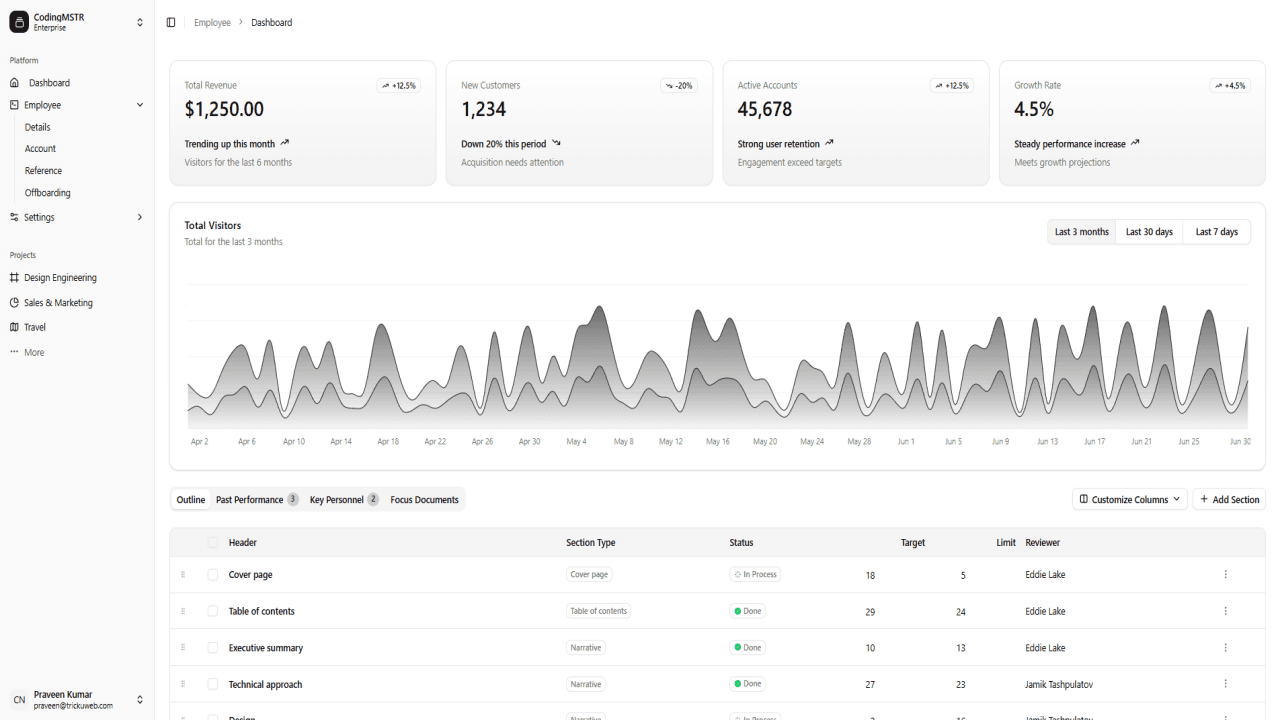
Project Description
The Employee Management System is a full-featured web application designed to streamline HR operations using a powerful modern tech stack—React JS (with Shadcn UI), Laravel, MySQL, and Tailwind CSS. Built with a focus on performance, responsiveness, and user experience, this system allows organizations to manage employee records, track attendance, process payroll, and monitor performance efficiently.
The frontend, crafted with React JS and Shadcn UI components, delivers a clean and dynamic user interface, while Tailwind CSS ensures mobile-first, utility-driven styling. The robust Laravel backend provides secure APIs and seamless server-side logic, and MySQL powers the relational database for fast and reliable data storage.
Ideal for HR teams and business owners, this solution reduces manual work, improves data accuracy, and supports role-based access control and reporting tools—all in a single, scalable platform.
Employee Management System Using React JS (Shadcn), Tailwind CSS, Laravel 12, and MySQL
Overview
The Employee Management System (EMS) is a powerful and responsive web-based application designed to help organizations effectively manage their human resources operations. Developed using the latest web technologies, the system features a modern React JS frontend with Shadcn UI and Tailwind CSS, paired with a robust Laravel 12 backend and MySQL as the database layer.
This system is tailored for HR departments, team managers, and business owners looking for an easy-to-use, scalable, and feature-rich platform to manage employee records, attendance, payroll, leave requests, performance reviews, and more.
Tech Stack
✅ Frontend:
-
React JS: A declarative, component-based JavaScript library for building fast and scalable UIs.
-
Shadcn UI: A modern component library built on top of Radix UI and Tailwind CSS, offering beautiful and accessible components.
-
Tailwind CSS: A utility-first CSS framework for building custom UI rapidly.
-
Vite: For faster and optimized frontend builds and hot module replacement.
✅ Backend:
-
Laravel 12: A powerful PHP framework for building secure, scalable APIs and web applications.
-
MySQL: A relational database management system to handle data storage efficiently.
-
Laravel Sanctum or Passport: For secure API authentication (JWT or token-based).
-
RESTful APIs: To enable seamless frontend-backend communication.
Key Features
🔹 Employee Management
-
Add, edit, delete, and view employee profiles.
-
Store contact information, job titles, departments, salary details, and more.
-
-
Different permissions based on user roles.
🔹 Dashboard & Analytics
-
Interactive charts showing employee distribution, attendance patterns, and monthly reports.
System Requirements
✅ Frontend Requirements:
-
Node.js (v18 or higher)
-
NPM or Yarn
-
Git
✅ Backend Requirements:
-
PHP 8.2+
-
Composer
-
MySQL 8.x
-
Apache/Nginx
-
Laravel CLI
-
Postman (for API testing – optional)
Installation Guide
🚀 Frontend Installation (React JS + Shadcn + Tailwind CSS)
Step 1: Clone the Repository
git clone https://github.com/yourusername/employee-management-react.git
cd employee-management-react
Step 2: Install Dependencies
Make sure you have Node.js installed.
npm install
Step 3: Set Up Tailwind CSS and Shadcn
Tailwind is already preconfigured. To install Shadcn UI:
npx shadcn-ui@latest init
Install desired components:
npx shadcn-ui@latest add button card dialog
Step 4: Configure Environment
Create a .env file and set your backend API URL:
VITE_API_URL=http://localhost:8000/api
Step 5: Run the Development Server
npm run dev
Frontend is now accessible at http://localhost:5173.
🔧 Backend Installation (Laravel 12 + MySQL)
Step 1: Clone the Repository
git clone https://github.com/yourusername/employee-management-laravel.git
cd employee-management-laravel
Step 2: Install Dependencies
Make sure Composer is installed.
composer install
Step 3: Configure Environment
Copy the example environment file:
cp .env.example .env
Edit .env with your DB credentials:
DB_CONNECTION=mysql
DB_HOST=127.0.0.1DB_PORT=3306DB_DATABASE=ems_db
DB_USERNAME=root
DB_PASSWORD=yourpassword
Step 4: Generate App Key
php artisan key:generate
Step 5: Run Migrations and Seeders
php artisan migrate --seed
This will set up tables and seed default users and roles.
Step 6: Start Laravel Development Server
php artisan serve
Your backend will be available at http://localhost:8000.
🔐 API Authentication (Sanctum Setup)
Laravel Sanctum provides a featherweight authentication system for SPAs.
Sanctum Installation
composer require laravel/sanctum
php artisan vendor:publish --provider="Laravel\Sanctum\SanctumServiceProvider"
php artisan migrate
In config/sanctum.php, confirm:
'stateful' => explode(',', env('SANCTUM_STATEFUL_DOMAINS', 'localhost:5173')),
In Kernel.php, ensure:
\Laravel\Sanctum\Http\Middleware\EnsureFrontendRequestsAreStateful::class,
Add CSRF and CORS middleware rules.
Folder Structure Highlights
Frontend (React + Shadcn)
src/
  components/
    layout/
    ui/
    dashboard/
  pages/
    EmployeeList.jsx
    Attendance.jsx
    Payroll.jsx
  services/
    api.js
  hooks/
  App.jsx
Backend (Laravel)
app/
  Http/
    Controllers/
    Middleware/
  Models/
database/
  migrations/
  seeders/
routes/
  api.php
  web.php
Database Structure (MySQL)
Key Tables:
-
users: Employee login and role details. -
employees: Profile and job information. -
attendance_logs: Daily attendance records. -
leaves: Leave applications. -
payroll: Salary records and transactions. -
roles,permissions,role_user: Access control.
Each table has proper foreign keys and indexing for fast queries.
Deployment Recommendations
Frontend:
-
Host on Vercel, Netlify, or any static host.
-
Use environment variables for API URL.
Backend:
-
Host on Laravel Forge, DigitalOcean, Heroku, or Shared Hosting with PHP 8.2+ support.
-
Set
.envvalues securely and use HTTPS.
Database:
-
Use managed MySQL like PlanetScale, AWS RDS, or deploy locally via Docker.
Security Features
-
Password Hashing (bcrypt)
-
Email Verification (optional)
-
Role-Based Access Control
-
Sanctum Token Authentication
-
Input Validation (Laravel Form Requests)
-
CORS Configuration
Performance Optimization
-
Laravel API caching using
route cacheandconfig cache. -
Tailwind's
purgeenabled for removing unused styles. -
React code-splitting and lazy loading routes for large modules.
-
Debounced search and pagination for large data tables.
Future Enhancements (Suggestions)
-
✅ Multi-language support (i18n)
-
✅ Notifications via Email/SMS
-
✅ Two-factor authentication
-
✅ PDF export of employee reports
-
✅ Integration with biometric devices
-
✅ Mobile app (React Native)
Conclusion
This Employee Management System is a complete, production-ready HR solution built using the latest modern web technologies. With React JS + Shadcn UI on the frontend, and Laravel 12 with MySQL on the backend, it ensures a smooth, responsive, and secure user experience for businesses of all sizes.
Whether you're a solo developer, an HR manager, or a company looking for a ready-to-deploy HR portal, this system offers a solid foundation for custom expansion and enterprise-level scalability.