
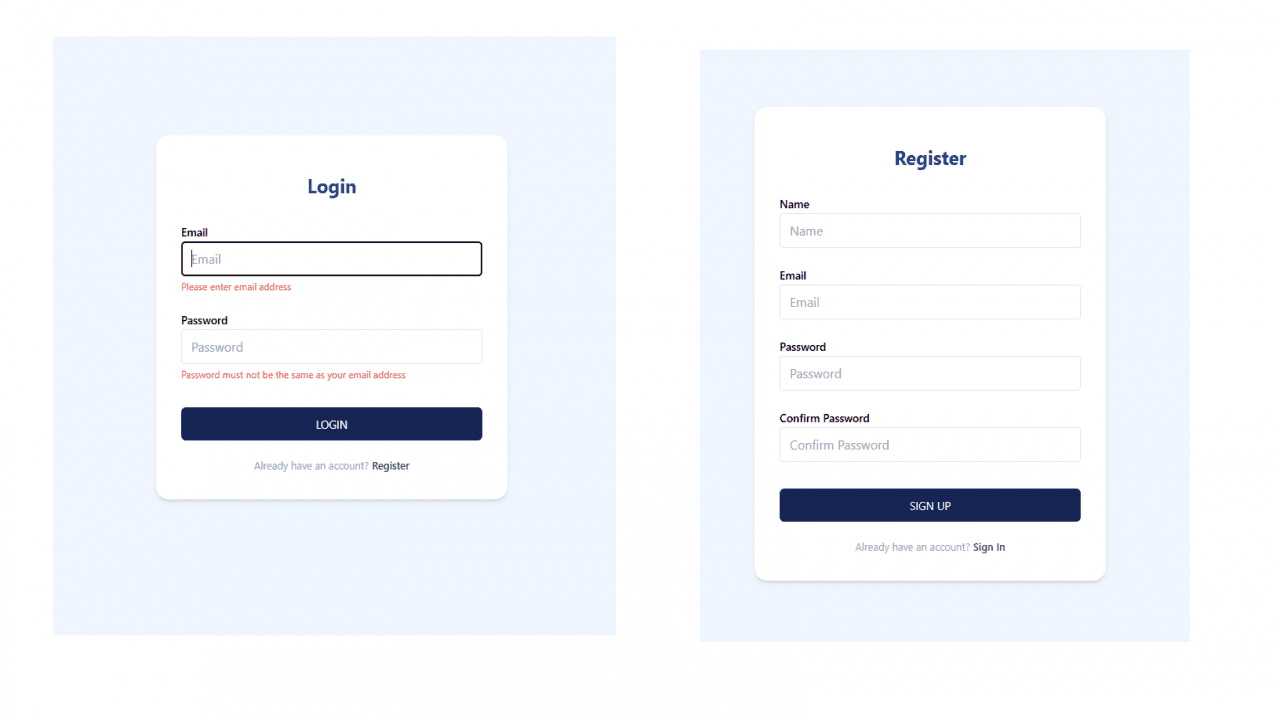
Project Description
In this article, we’ll create a Login and Registration form in React, using Tailwind CSS for styling and react-hook-form with Yup for validation.
The example form will validate user inputs for email and password, providing clear error messages when fields are filled out incorrectly. We’ll also use react-router-dom for navigation and react-hot-toast for user notifications.
Prerequisites
- Basic knowledge of React
- Familiarity with Tailwind CSS and React Router
- Basic understanding of form validation with Yup
Setup
Install Required Packages: Before we start, install the required dependencies:
bashnpm install react-router-dom react-hook-form @hookform/resolvers yup react-hot-toast axios tailwindcssInitialize Tailwind CSS: Tailwind CSS requires initial setup. To get started, follow the steps on the Tailwind CSS installation guide.
Form Schema
We’ll use Yup for validation. This example sets rules for email and password fields.
The email must be a valid format, while the password must be 8-20 characters long and differ from the email.
const schema = yup.object().shape({ name: yup.string().required('Please enter name'), email: yup.string().email().required('Please enter email address'), password: yup.string() .min(8, 'Password must be at least 8 characters') .max(20, 'Password must not exceed 20 characters') .notOneOf([yup.ref('email'), null], 'Password must not be the same as your email address') .required('Please enter password'), confirmPassword: yup.string() .oneOf([yup.ref('password'), null], 'Passwords must match') .required('Please confirm your password'),})
const schema = yup.object().shape({
name: yup.string().required('Please enter name'),
email: yup.string().email().required('Please enter email address'),
password: yup.string()
.min(8, 'Password must be at least 8 characters')
.max(20, 'Password must not exceed 20 characters')
.notOneOf([yup.ref('email'), null], 'Password must not be the same as your email address')
.required('Please enter password'),
confirmPassword: yup.string()
.oneOf([yup.ref('password'), null], 'Passwords must match')
.required('Please confirm your password'),
})
Creating the Form Component
The Login component will use react-hook-form for easy validation handling, and Yup as a validation resolver. When the user submits valid data, we’ll attempt to register the user via an API call (using Axios). Feedback is displayed using react-hot-toast.
Here’s the complete code:
Login Component
import { useNavigate } from 'react-router-dom';import { useForm } from 'react-hook-form';import * as yup from 'yup';import { yupResolver } from '@hookform/resolvers/yup';import toast, { Toaster } from 'react-hot-toast';import axios from 'axios';
const schema = yup.object().shape({ email: yup.string().email().required('Please enter email address'), password: yup.string() .min(8, 'Password must be at least 8 characters') .max(20, 'Password must not exceed 20 characters') .notOneOf([yup.ref('email'), null], 'Password must not be the same as your email address') .required('Please enter password'), })
export default function Login() { const navigate = useNavigate();
const { register, handleSubmit, formState: { errors } } = useForm({ resolver: yupResolver(schema), defaultValues: { email: '', password: '', confirmPassword: '', } });
const onSubmitNew = async (data) => { console.log(data); try { const res = await axios.post('/api/auth/register', data); toast.success('User registered successfully.'); navigate('/'); } catch (error) { toast.error(error.response?.data?.message || 'Something went wrong'); } };
return ( <div className="flex items-center justify-center min-h-screen bg-blue-50"> <Toaster /> <form onSubmit={handleSubmit(onSubmitNew)} className="w-full max-w-md p-8 space-y-4 bg-white shadow-md rounded-2xl" > <div> <h2 className="text-2xl font-bold mb-7 text-center mt-3 text-blue-900">Login</h2>
<div className="mt-5"> <label htmlFor="email" className="text-sm font-semibold mb-1"> Email </label> <input className="w-full px-3 py-2 border rounded" type="email" placeholder="Email" {...register("email")} /> {errors?.email && ( <p className="text-red-500 text-xs mt-1">{errors.email?.message}</p> )} </div>
<div className="mt-5"> <label htmlFor="password" className="text-sm font-semibold mb-1"> Password </label> <input className="w-full px-3 py-2 border rounded" type="password" placeholder="Password" {...register("password")} /> {errors?.password && ( <p className="text-red-500 text-xs mt-1">{errors.password?.message}</p> )} </div>
<div className="mt-8"> <button className="w-full px-3 py-2 text-white bg-blue-950 hover:bg-blue-900 rounded-md" type="submit" > <span className="text-sm"> LOGIN </span> </button> </div>
<div className="mt-5 text-center"> <p className="text-[13px] cursor-pointer text-slate-400 mt-1"> Already have an account? <span className="ml-1 font-semibold hover:text-blue-900 text-slate-700" onClick={() => { navigate('/auth/register') }} > Register </span> </p> </div>
</div> </form> </div> );}
import { useNavigate } from 'react-router-dom';
import { useForm } from 'react-hook-form';
import * as yup from 'yup';
import { yupResolver } from '@hookform/resolvers/yup';
import toast, { Toaster } from 'react-hot-toast';
import axios from 'axios';
const schema = yup.object().shape({
email: yup.string().email().required('Please enter email address'),
password: yup.string()
.min(8, 'Password must be at least 8 characters')
.max(20, 'Password must not exceed 20 characters')
.notOneOf([yup.ref('email'), null], 'Password must not be the same as your email address')
.required('Please enter password'),
})
export default function Login() {
const navigate = useNavigate();
const { register, handleSubmit, formState: { errors } } = useForm({
resolver: yupResolver(schema),
defaultValues: {
email: '',
password: '',
confirmPassword: '',
}
});
const onSubmitNew = async (data) => {
console.log(data);
try {
const res = await axios.post('/api/auth/register', data);
toast.success('User registered successfully.');
navigate('/');
} catch (error) {
toast.error(error.response?.data?.message || 'Something went wrong');
}
};
return (
<div className="flex items-center justify-center min-h-screen bg-blue-50">
<Toaster />
<form onSubmit={handleSubmit(onSubmitNew)}
className="w-full max-w-md p-8 space-y-4 bg-white shadow-md rounded-2xl"
>
<div>
<h2 className="text-2xl font-bold mb-7 text-center mt-3 text-blue-900">Login</h2>
<div className="mt-5">
<label htmlFor="email" className="text-sm font-semibold mb-1">
Email
</label>
<input
className="w-full px-3 py-2 border rounded"
type="email"
placeholder="Email"
{...register("email")}
/>
{errors?.email && (
<p className="text-red-500 text-xs mt-1">{errors.email?.message}</p>
)}
</div>
<div className="mt-5">
<label htmlFor="password" className="text-sm font-semibold mb-1">
Password
</label>
<input
className="w-full px-3 py-2 border rounded"
type="password"
placeholder="Password"
{...register("password")}
/>
{errors?.password && (
<p className="text-red-500 text-xs mt-1">{errors.password?.message}</p>
)}
</div>
<div className="mt-8">
<button
className="w-full px-3 py-2 text-white bg-blue-950
hover:bg-blue-900 rounded-md"
type="submit"
>
<span className="text-sm">
LOGIN
</span>
</button>
</div>
<div className="mt-5 text-center">
<p className="text-[13px] cursor-pointer text-slate-400 mt-1">
Already have an account?
<span className="ml-1 font-semibold hover:text-blue-900 text-slate-700"
onClick={() => {
navigate('/auth/register')
}}
>
Register
</span>
</p>
</div>
</div>
</form>
</div>
);
}
Signup Component
import { useNavigate } from 'react-router-dom';import { useForm } from 'react-hook-form';import * as yup from 'yup';import { yupResolver } from '@hookform/resolvers/yup';import toast, { Toaster } from 'react-hot-toast';import axios from 'axios';
const schema = yup.object().shape({ name: yup.string().required('Please enter name'), email: yup.string().email().required('Please enter email address'), password: yup.string() .min(8, 'Password must be at least 8 characters') .max(20, 'Password must not exceed 20 characters') .notOneOf([yup.ref('email'), null], 'Password must not be the same as your email address') .required('Please enter password'), confirmPassword: yup.string() .oneOf([yup.ref('password'), null], 'Passwords must match') .required('Please confirm your password'),})
export default function Login() { const navigate = useNavigate();
const { register, handleSubmit, formState: { errors } } = useForm({ resolver: yupResolver(schema), defaultValues: { email: '', password: '', confirmPassword: '', } });
const onSubmitNew = async (data) => { console.log(data); try { const res = await axios.post('/api/auth/register', data); toast.success('User registered successfully.'); navigate('/auth/login'); } catch (error) { toast.error(error.response?.data?.message || 'Something went wrong'); } };
return ( <div className="flex items-center justify-center min-h-screen bg-blue-50"> <Toaster /> <form onSubmit={handleSubmit(onSubmitNew)} className="w-full max-w-md p-8 space-y-4 bg-white shadow-md rounded-2xl" > <div> <h2 className="text-2xl font-bold mb-7 text-center mt-3 text-blue-900"> Register </h2> <div> <label htmlFor="email" className="text-sm font-semibold mb-1"> Name </label> <input className="w-full px-3 py-2 border rounded" type="text" placeholder="Name" {...register("name")} /> {errors?.name && ( <p className="text-red-500 text-xs mt-1">{errors.name?.message}</p> )} </div>
<div className="mt-5"> <label htmlFor="email" className="text-sm font-semibold mb-1"> Email </label> <input className="w-full px-3 py-2 border rounded" type="email" placeholder="Email" {...register("email")} /> {errors?.email && ( <p className="text-red-500 text-xs mt-1">{errors.email?.message}</p> )} </div>
<div className="mt-5"> <label htmlFor="password" className="text-sm font-semibold mb-1"> Password </label> <input className="w-full px-3 py-2 border rounded" type="password" placeholder="Password" {...register("password")} /> {errors?.password && ( <p className="text-red-500 text-xs mt-1">{errors.password?.message}</p> )} </div>
<div className="mt-5"> <label htmlFor="confirmPassword" className="text-sm font-semibold mb-1"> Confirm Password </label> <input className="w-full px-3 py-2 border rounded" type="password" placeholder="Confirm Password" {...register("confirmPassword")} /> {errors?.confirmPassword && ( <p className="text-red-500 text-xs mt-1">{errors.confirmPassword?.message}</p> )} </div>
<div className="mt-8"> <button className="w-full px-3 py-2 text-white bg-blue-950 hover:bg-blue-900 rounded-md" type="submit" > <span className="text-sm"> SIGN UP </span> </button> </div>
<div className="mt-5 text-center"> <p className="text-[13px] cursor-pointer text-slate-400 mt-1"> Already have an account? <span className="ml-1 font-semibold hover:text-blue-900 text-slate-700" onClick={() => { navigate('/auth/login') }} > Sign In </span> </p> </div>
</div> </form> </div> );}
import { useNavigate } from 'react-router-dom';
import { useForm } from 'react-hook-form';
import * as yup from 'yup';
import { yupResolver } from '@hookform/resolvers/yup';
import toast, { Toaster } from 'react-hot-toast';
import axios from 'axios';
const schema = yup.object().shape({
name: yup.string().required('Please enter name'),
email: yup.string().email().required('Please enter email address'),
password: yup.string()
.min(8, 'Password must be at least 8 characters')
.max(20, 'Password must not exceed 20 characters')
.notOneOf([yup.ref('email'), null], 'Password must not be the same as your email address')
.required('Please enter password'),
confirmPassword: yup.string()
.oneOf([yup.ref('password'), null], 'Passwords must match')
.required('Please confirm your password'),
})
export default function Login() {
const navigate = useNavigate();
const { register, handleSubmit, formState: { errors } } = useForm({
resolver: yupResolver(schema),
defaultValues: {
email: '',
password: '',
confirmPassword: '',
}
});
const onSubmitNew = async (data) => {
console.log(data);
try {
const res = await axios.post('/api/auth/register', data);
toast.success('User registered successfully.');
navigate('/auth/login');
} catch (error) {
toast.error(error.response?.data?.message || 'Something went wrong');
}
};
return (
<div className="flex items-center justify-center min-h-screen bg-blue-50">
<Toaster />
<form onSubmit={handleSubmit(onSubmitNew)}
className="w-full max-w-md p-8 space-y-4 bg-white shadow-md rounded-2xl"
>
<div>
<h2 className="text-2xl font-bold mb-7 text-center mt-3 text-blue-900">
Register
</h2>
<div>
<label htmlFor="email" className="text-sm font-semibold mb-1">
Name
</label>
<input
className="w-full px-3 py-2 border rounded"
type="text"
placeholder="Name"
{...register("name")}
/>
{errors?.name && (
<p className="text-red-500 text-xs mt-1">{errors.name?.message}</p>
)}
</div>
<div className="mt-5">
<label htmlFor="email" className="text-sm font-semibold mb-1">
Email
</label>
<input
className="w-full px-3 py-2 border rounded"
type="email"
placeholder="Email"
{...register("email")}
/>
{errors?.email && (
<p className="text-red-500 text-xs mt-1">{errors.email?.message}</p>
)}
</div>
<div className="mt-5">
<label htmlFor="password" className="text-sm font-semibold mb-1">
Password
</label>
<input
className="w-full px-3 py-2 border rounded"
type="password"
placeholder="Password"
{...register("password")}
/>
{errors?.password && (
<p className="text-red-500 text-xs mt-1">{errors.password?.message}</p>
)}
</div>
<div className="mt-5">
<label htmlFor="confirmPassword" className="text-sm font-semibold mb-1">
Confirm Password
</label>
<input
className="w-full px-3 py-2 border rounded"
type="password"
placeholder="Confirm Password"
{...register("confirmPassword")}
/>
{errors?.confirmPassword && (
<p className="text-red-500 text-xs mt-1">{errors.confirmPassword?.message}</p>
)}
</div>
<div className="mt-8">
<button
className="w-full px-3 py-2 text-white
bg-blue-950 hover:bg-blue-900 rounded-md"
type="submit"
>
<span className="text-sm">
SIGN UP
</span>
</button>
</div>
<div className="mt-5 text-center">
<p className="text-[13px] cursor-pointer text-slate-400 mt-1">
Already have an account?
<span className="ml-1 font-semibold hover:text-blue-900 text-slate-700"
onClick={() => {
navigate('/auth/login')
}}
>
Sign In
</span>
</p>
</div>
</div>
</form>
</div>
);
}
Explanation of the Code
- Form Setup: We use
useFormfromreact-hook-form, passing the Yup schema as a resolver toyupResolver. - API Request: When the form is submitted,
onSubmitNewis triggered, making a POST request to/api/auth/register. Upon success, a toast notification is displayed, and the user is navigated back to the home page. - Styling with Tailwind CSS: The form and its fields are styled using Tailwind CSS classes. The form is centrally aligned on the screen and designed to be responsive.
- Validation Error Messages: Error messages from Yup validation display under each input field if validation fails.