
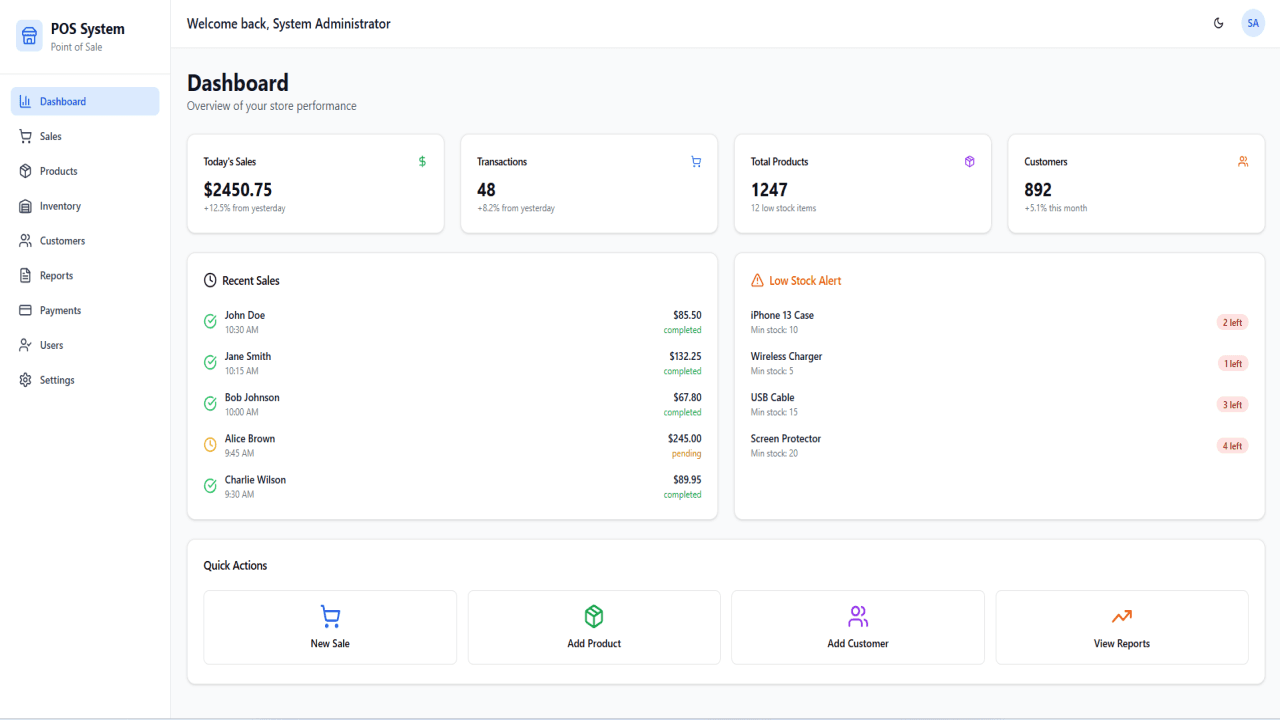
Project Description
Looking to streamline your sales and inventory operations with a modern, responsive, and feature-rich solution? Download our advanced POS (Point of Sale) system developed using React, the powerful front-end JavaScript library trusted by top developers worldwide.
This React-based POS system is ideal for retail stores, restaurants, cafes, and service-based businesses, offering lightning-fast performance, a sleek user interface, and full mobile responsiveness. Whether you're a business owner or a developer, this open-source POS solution is designed to be fully customizable and ready for real-world deployment.
✅ Included Modules:
-
Product Management: Easily add, edit, and manage products with categories, prices, and stock details. -
Sales Module: Process sales in real time with itemized billing, discounts, and multiple payment options.
-
Inventory Control: Track stock levels, receive low-stock alerts, and manage suppliers seamlessly.
-
Customer Management: Create and manage customer profiles, loyalty information, and purchase history.
-
Reports & Analytics: Generate detailed sales, inventory, and customer reports to help make data-driven decisions.
-
Payment Integration: Support for cash, card, and digital payments with receipt printing capabilities.
-
User Management: Add multiple users with role-based access control for Admins, Cashiers, and Managers.
-
Settings Panel: Configure business information, tax settings, currency, printer options, and more.
-
Secure Login Page: Secure authentication with user login, password protection, and session handling.
This POS system is lightweight, scalable, and easy to deploy on any modern web server. Whether you're building a standalone retail POS or integrating with a larger ERP, this system provides a robust foundation.
🔧 Tech Stack Highlights
-
⚡️ Vite – Super-fast build tool with instant hot module replacement
-
⚛️ React 18 – Leverage the latest React features for modern app development
-
🔐 TypeScript – Strong typing for enhanced code quality and editor support
-
🎨 TailwindCSS – Utility-first CSS framework for rapid UI development
-
🧩 ShadCN UI – Beautiful, accessible, and customizable UI components
-
📱 Responsive Design – Mobile-first layout by default
-
🧭 React Router – Client-side routing made simple
-
🔄 React Query – Powerful data fetching and caching
-
✅ Form Handling – Built-in support with React Hook Form and Zod validation
🚀 Getting Started
✅ Prerequisites
-
Node.js (v18 or higher)
-
A package manager: npm, yarn, or pnpm
-
Install dependencies:
npm install # or yarn # or pnpm install -
Start the development server:
npm run dev # or yarn dev # or pnpm dev -
Open in browser:
Visit http://localhost:5173 to view your app.
📁 Project Structure
react-template-project/
├── public/              # Static assets
├── src/
│   ├── components/      # Reusable components
│   │   └── ui/          # UI components (ShadCN)
│   ├── hooks/           # Custom React hooks
│   ├── lib/             # Utilities and helper functions
│   ├── pages/           # Application pages
│   ├── App.tsx          # Main app component with routes
│   ├── index.css        # Global styles
│   └── main.tsx         # Entry point
├── .gitignore
├── package.json         # Project metadata and scripts
├── tailwind.config.ts   # TailwindCSS configuration
├── tsconfig.json        # TypeScript settings
└── vite.config.ts       # Vite configuration
🛠 Customization Tips
-
🎨 Theme & Styling: Customize colors, spacing, and more in
tailwind.config.ts -
🧩 UI Components: Modify or create new ones under
src/components/ -
🗂 Routing & Pages: Add routes and views in
src/pagesandApp.tsx -
🔌 API & Logic: Place logic, API functions, and utilities in
src/liborsrc/hooks
🏁 Build for Production
Compile and optimize your app for production:
npm run build
# or
yarn build
# or
pnpm build
The final build will be available in the dist directory, ready to deploy.