
Project Description
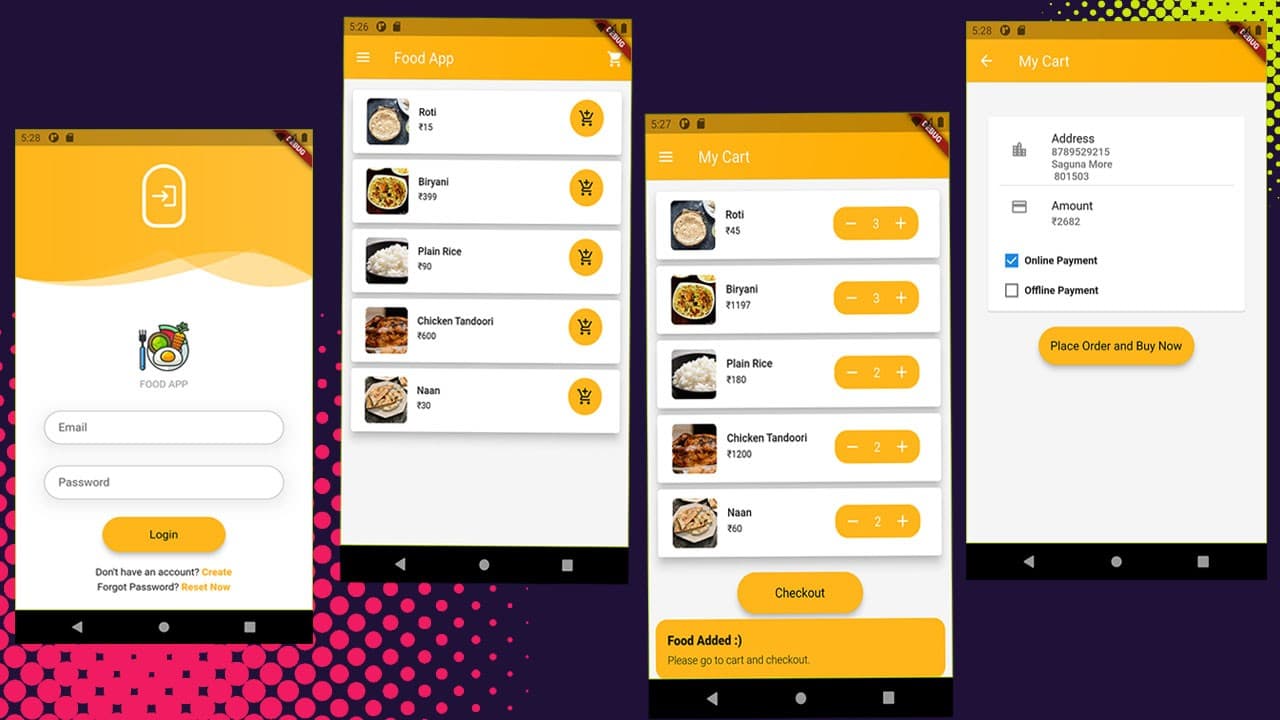
Craving delicious food? Our restaurant and food app with an admin panel is the perfect solution for foodies looking for an exceptional dining experience.
With our easy-to-use app, you can browse menus, place orders, and pay for your food all from the comfort of your smartphone. Our app also features an admin panel that enables restaurant owners to easily manage their menus, track orders, and communicate with customers.
Powered by cutting-edge technology, our restaurant and food app is fast, secure, and reliable, making it the ideal platform for restaurants looking to expand their customer base and streamline their operations. Whether you're looking for a quick bite on the go or a fine dining experience, our restaurant and food app has you covered.
Download and get the source code of the Food App built with Flutter and Firebase
The Admin Portal of this App is developed using React and Firebase.
Features:
- User Login and Registration Feature
- Add to cart feature
- Online payment using Razor pay
- Admin Panel to track orders, users, and products
- Admin panel built using React and Firebase
- Upload food menu with different category
- Upload menu picture in firebase storage
- User profile editing feature in App
Steps
1. Download the code
2. You'll get two folders one is for App and the other is for the admin portal
3. Create an account in firebase
4. Add a Google firebase JSON file in your app from firebase
5. Activate Firestore, Authentication, and Storage in your firebase.
6. Pase firebase config details in your react app
7. Don't forget to edit firebase rules e.g.,
Cloud Firestore
rules_version = '2';
service cloud.firestore {
match /databases/{database}/documents {
match /{document=**} {
allow read, write: if
request.time < timestamp.date(2028, 1, 8);
}
}
}