
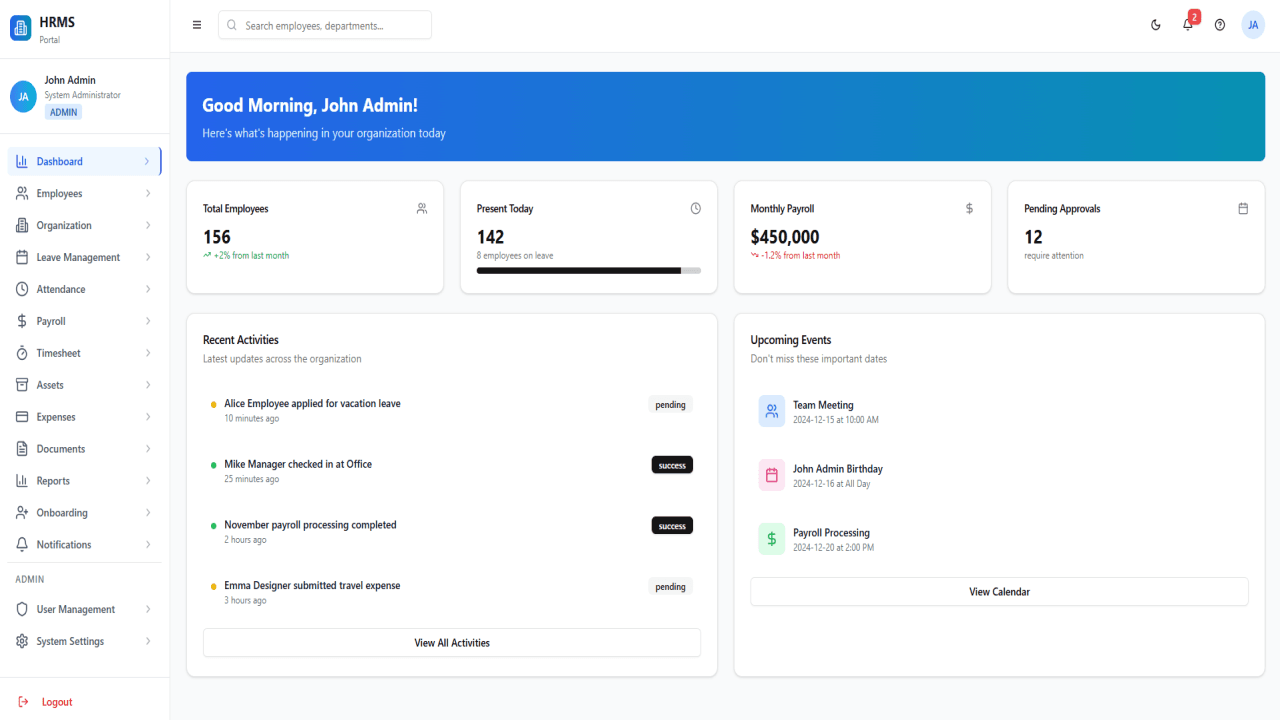
Project Description
Title:
Complete HRMS Software UI in React: Scalable, Modular, and Feature-Rich Human Resource Interface
Meta Description:
Explore a powerful and modern HRMS UI built with React, offering enterprise-grade features like employee management, payroll,
attendance, and more. A fully responsive, modular, and customizable UI solution for your HR tech stack.
Introduction
In today's fast-paced digital workplace, Human Resource Management Systems (HRMS) have become indispensable tools for organizations of all sizes. Whether you're managing a startup or an enterprise, the need for an intuitive, responsive, and feature-rich HRMS UI is undeniable. This article delves into a cutting-edge HRMS Software UI built entirely with React—a leading JavaScript library known for building dynamic user interfaces.
This UI system is designed to manage a wide array of HR functionalities including, but not limited to, Employee Management, Payroll, Attendance, Leave
Management, and more. It serves as a robust front-end layer that integrates seamlessly with any backend or API system.
Why React for HRMS UI?
React is widely adopted due to its component-based architecture, excellent performance, and large ecosystem. Here are key reasons for choosing React:
Reusable Components: Allows for modular development.
Virtual DOM: Enhances performance and efficiency.
React Hooks: Simplifies state and lifecycle management.
Strong Community Support: Continuous updates and extensive libraries.
React's capabilities make it ideal for building scalable and maintainable UIs, especially for complex systems like an HRMS.
Key Modules and Features
1. Dashboard
A central overview that displays real-time analytics, employee metrics, attendance summaries, and notifications. Built with charting libraries like Recharts or Chart.js for visual impact.
2. Employee Management
Manage employee records, roles, profiles, documents, and lifecycle events. Features include:
CRUD operations
Role-based access control
Integration-ready structure for APIs
3. Organization Management
Visual hierarchy trees, department mapping, and cross-functional team support. Ensures clarity and data-driven decision-making.
4. Leave Management
Allows employees to apply for leaves while enabling managers to approve, reject, or comment. Features:
Leave balance tracking
Leave type configuration
Holiday calendar integration
5. Attendance Tracking
Track daily check-ins, check-outs, and working hours. Compatible with biometric and GPS systems. Includes:
Daily logs
Real-time sync
Notifications for anomalies
6. Payroll Management
Handles complex salary structures, tax deductions, bonuses, and payslip generation. Includes:
Payroll templates
Tax computation logic
Bulk payroll processing
7. Timesheet Management
Enables time logging for specific projects and tasks, with managerial approval workflows. Features:
Weekly/monthly views
Integration with project management tools
8. Asset Management
Track company assets assigned to employees. Includes:
Asset request workflows
Return management
Maintenance logs
9. Expense Management
Simplifies reimbursement workflows and tracks spending per employee or department. Includes:
Receipt uploads
Expense categories
Approval hierarchy
10. Document Management
Securely manage and store employee documents, policies, and HR files. Features:
Tag-based organization
Permission controls
Expiry alerts
11. Reports & Analytics
Generate reports for all modules with export options. Includes:
Custom report builder
Pre-defined templates
Visualization tools
12. Onboarding
Streamlines the hiring and onboarding process. Features:
Task checklists
Welcome emails
Digital document signing
13. Notification System
In-app alerts, email notifications, and SMS integration for real-time updates. Includes:
Configurable templates
Notification preferences
14. User Management
Advanced user and role management with permission granularity. Includes:
Role creation
User activity logs
Authentication integration
15. System Settings
Customize and configure the application according to organizational needs. Includes:
Localization support
Theme customization
Feature toggles
Technical Highlights
Modular Architecture
Built using atomic design principles, allowing every feature to be encapsulated and independently developed/tested.
State Management
Efficient state handling using React Context API and Redux Toolkit for large-scale data flow.
API Integration
REST and GraphQL ready. Includes services folder with Axios setup and interceptors.
Responsive Design
Fully mobile-responsive with support for desktops, tablets, and smartphones. Uses Tailwind CSS for modern utility-first styling.
Accessibility & UX
SEO & Performance Optimization
While primarily a front-end application, several SEO best practices are followed:
Meta tag injection with React Helmet
Code splitting and lazy loading for performance
Pre-rendering options with frameworks like Next.js (if SSR is needed)
Use Cases
Startups: Lightweight deployments with rapid feature rollouts.
SMEs: Scalable solution to manage growing HR needs.
Enterprises: Integrates with SAP, Oracle, and other legacy systems via API.
Conclusion
This HRMS UI in React offers a powerful, scalable, and highly customizable solution for modern HR needs. Whether you're building a standalone HR system or integrating into an existing HRMS backend, this React-based front end provides a robust and future-ready interface.
Its modularity, modern design, and extensive feature set make it a top-tier choice for developers and HR tech companies looking to deliver exceptional user experiences. Built for performance, optimized for growth, and designed for people-first HR operations.
Keywords: HRMS UI, HRMS React, Human Resource Management UI, Employee Management System UI, React HR Dashboard, HR Frontend in React, HR Tech UI, HR Software Design, React Admin Panel HR, Custom HR Interface
- ⚡️ Vite - Lightning fast build tool
- 🔥 React 18 - Latest React features
- 🧩 TypeScript - Type safety for better developer experience
- 🎨 TailwindCSS - Utility-first CSS framework
- 🧰 ShadCN UI - Accessible and customizable UI components
- 📱 Responsive Design - Mobile-first approach
- 🧭 React Router - Easy client-side routing
- 🔄 React Query - Data fetching and state management
- 🧪 Form Handling - React Hook Form with Zod validation
- Node.js 18+
- npm or yarn or pnpm
- Clone this repository:
git clone https://github.com/your-username/react-template-project.git
cd react-template-project- Install dependencies:
npm install
# or
yarn
# or
pnpm install
- Start the development server:
npm run dev
# or
yarn dev
# or
pnpm dev
- Open your browser and visit
http://localhost:5173
react-template-project/
├── public/              # Static assets
│   ├── components/      # Reusable components
│   │   └── ui/          # UI components from ShadCN
│   ├── hooks/           # Custom React hooks
│   ├── lib/             # Utility functions and libraries
│   ├── pages/           # Page components
│   ├── App.tsx          # Main application component
│   ├── index.css        # Global styles
│   └── main.tsx         # Application entry point
├── .gitignore
├── package.json         # Project dependencies and scripts
├── tailwind.config.ts   # TailwindCSS configuration
├── tsconfig.json        # TypeScript configuration
└── vite.config.ts       # Vite configuration
- Styling: Modify
tailwind.config.tsto customize your design tokens - Components: Add or modify components in the
src/componentsdirectory - Pages: Create new pages in the
src/pagesdirectory - Routing: Update routes in
src/App.tsx
npm run build
# or
yarn build
# or
pnpm build
The built files will be in the dist directory, ready to be deployed.