
Project Description
About the Project
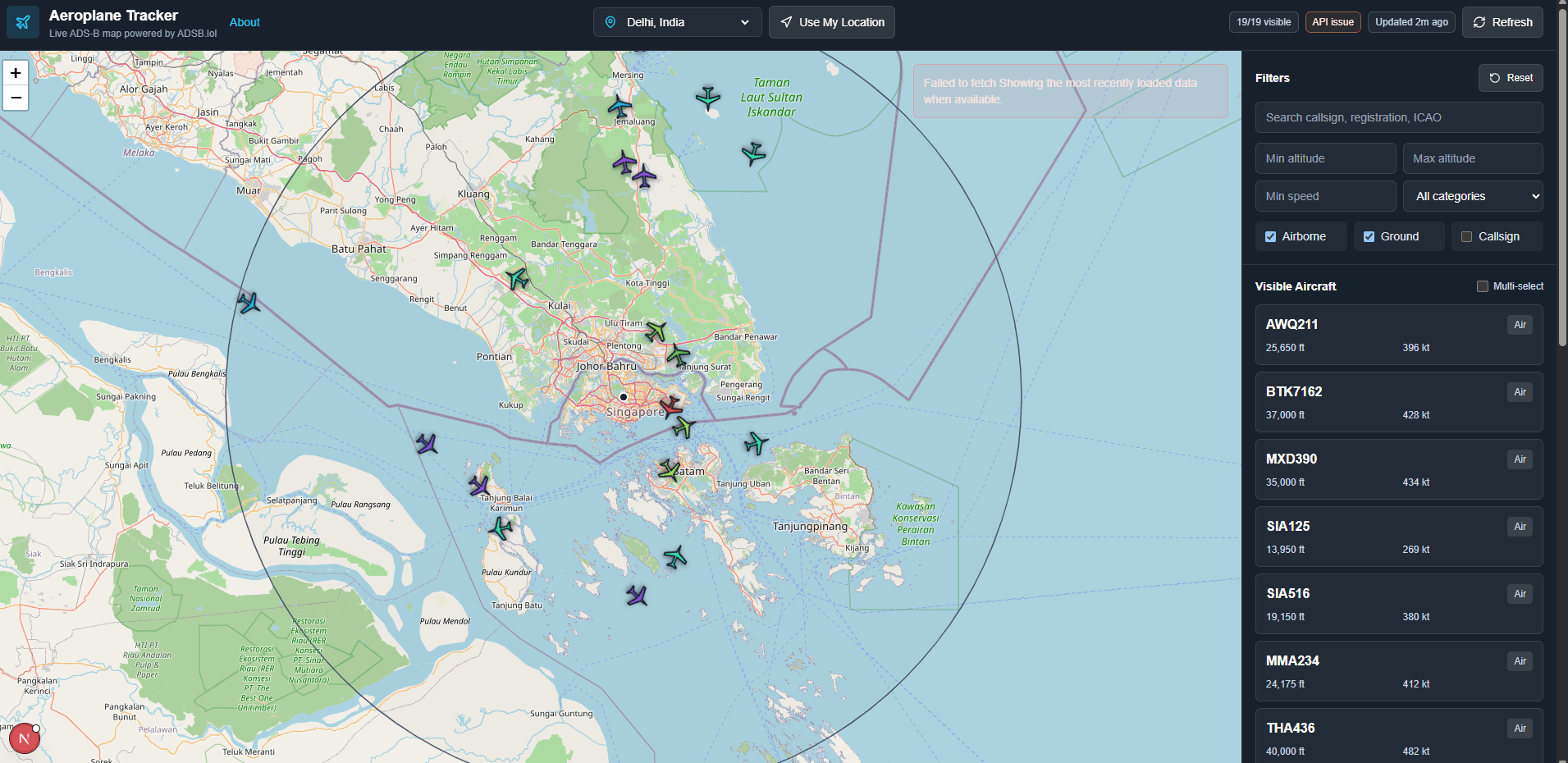
Have you ever wanted to build your own real-time flight radar like Flightradar24 or FlightAware? This project is a complete, production-grade Live Aeroplane Tracker built from scratch using the latest Next.js 15 App Router, React 19, and React Leaflet.
It fetches real-time ADS-B aircraft telemetry directly from public transponders and visualizes active flights as rotated, interactive plane markers on a map interface. The backend features a robust API proxy with request validation via Zod, timeout safety nets, data normalization, and lightweight in-memory caching to avoid hitting rate limits.
Whether you want to showcase this on your front-end portfolio, submit it as a college project, or expand it into a commercial GIS solution, this source code serves as the perfect foundation.
🚀 Key Features
- Live Interactive Radar Map: Interactive OpenStreetMap canvas utilizing React Leaflet with smoothly updated aircraft markers rotated to represent their precise heading/direction.
- Geographic (GEO) Local Tracking: Immediately view planes in your local airspace using your browser's Geolocation API, or select from pre-configured global flight hotspots (e.g., New York, London, Tokyo).
- Next.js API proxy with Cache: Robust backend API endpoint that proxies flight data from
ADSB.lol. It handles error mitigation, data sanitization, and has built-in short duration in-memory caching to protect API limits. - Detailed Airframe HUD Panel: Click any flight to view detailed metrics including callsign, registration number, altitude (ft), speed (kts), heading, aircraft category, and transponder type.
- Advanced Search & Filtration: Filter flights in real-time by altitude, speed, commercial/military status, and category, or use the instant search bar to find specific flights.
- Responsive Glassmorphism UI: A sleek dashboard wrapper crafted with Tailwind CSS that dynamically scales from full-screen desktops to mobile viewports.
- Robust Quality Architecture: Fully configured with Vitest for unit/integration tests, TypeScript for strict type checking, and ESLint for code style enforcement.
🛠️ Technology Stack & Dependencies
This project leverages modern, industry-standard web development technologies:
- Framework: Next.js 15 (App Router & Server Actions ready)
- Library: React 19
- Map Rendering: React Leaflet 5 & Leaflet 1.9 (OpenStreetMap Tiles)
- Styling: Tailwind CSS 3
- Validation: Zod (For robust API response validation)
- Icons: Lucide React
- Testing: Vitest & React Testing Library
- Language: TypeScript
⚙️ How to Setup and Run Locally
Follow these quick steps to get the live flight tracking map running on your local machine:
Prerequisites
Ensure you have Node.js (v18.x or higher) and npm installed.
1. Clone the Project & Install Dependencies
Navigate to the directory and install all required node modules:
# Install dependencies
npm install
2. Configure Environment Variables
Copy the template file to set up configuration defaults:
cp .env.example .env.local
(No external API keys are required for basic setup as the app pulls from public ADSB channels, but you can configure custom ports or rate limits in this file)
3. Run Development Server
Spin up the Next.js local server:
npm run dev
Open http://localhost:3000 in your browser to view the interactive map.
4. Run Quality Checks & Tests
Execute automated tests and linting constraints to verify project health:
# Run unit and integration tests
npm run test:run

# Run TypeScript compilation checks
npm run typecheck

# Lint files for style guidelines
npm run lint

# Build production optimized bundle
npm run build
🗺️ Project Structure Overview
├── src/
│   ├── app/                 # Next.js App Router folders (pages, layouts, API proxy)
│   │   ├── api/flight/      # Server-side proxy handling ADSB API calls
│   │   ├── layout.tsx       # Global layouts, SEO tags, and meta structures
│   │   └── page.tsx         # Main entry dashboard view
│   ├── components/          # Reusable React components
│   │   ├── map/             # Map overlays, Leaflet bindings, custom markers
│   │   ├── aircraft/        # HUD Detail panels, filtered lists, search components
│   │   └── ui/              # Glassmorphic controls, indicators, badges
│   ├── hooks/               # Custom hooks for fetching and geo-tracking
│   ├── types/               # Type definitions and Zod validation schemas
│   └── utils/               # Coordinate helpers, cache configurations, distance solvers
├── tests/                   # Component and API test cases
├── public/                  # Static assets (plane icons, map sprites)
└── package.json             # Build commands and dependency logs