
Project Description
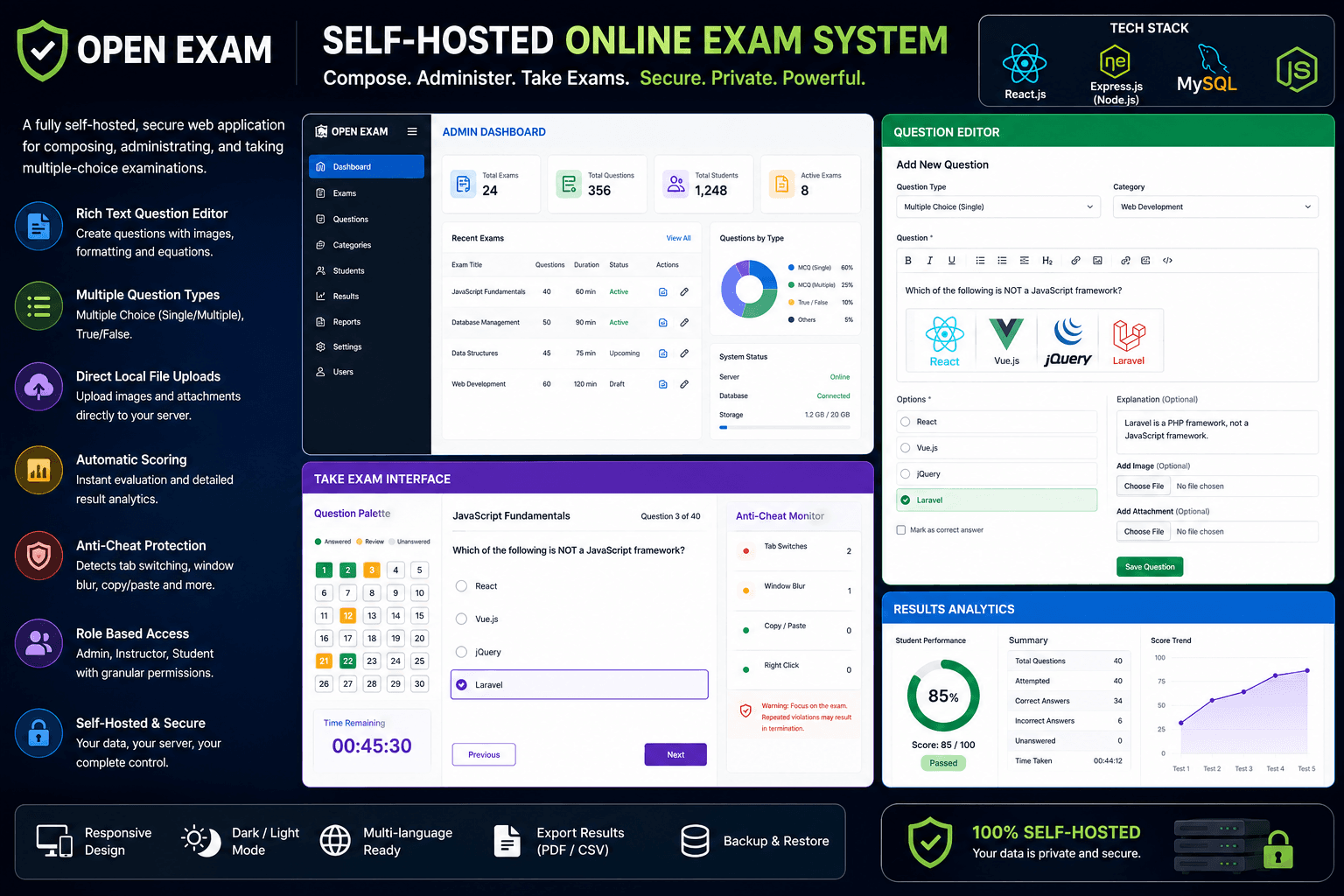
The Online MCQ Assessment & Examination Portal is an all-in-one testing solution designed for teachers, schools, coaching centers, and businesses. By moving away from cloud-dependent configurations, this app gives you complete control over your users, test banks, and results on your own servers.
The application implements a secure, role-based dual-panel system:
1. 👨💼 Administrator Panel
- Student Accounts Management: Full administrative control to register student logins, edit profiles (Student ID, department, year), or delete accounts.
- Interactive Question Bank: compose questions with the Jodit Rich Text Editor, allowing equations, bold highlights, customizable font sizes, and tables.
- Local Image Library: Drag-and-drop or paste images directly into questions. Images are handled by
multerand saved directly on the Express server's disk space, making image hosting simple and free. - Result Analytics logs: Real-time aggregated scorecard dashboard tracking all test attempts across all students.
2. 🎓 Student Panel
- Performance Metrics: Personal dashboard tracking total tests taken, highest score, lowest score, and overall averages.
- Interactive Quiz Client: Dynamic multi-choice client with direct progress tracking, navigation grid, and instant score summaries upon completion.
- Cheat Detection System: Integrates tab-focus event listeners. If a student leaves the browser tab to search for answers, the quiz shows alert warnings and increments a "tab switch" cheat counter.
🔧 Technologies Used
- Frontend Web App: React JS (v19), React Router DOM (v6), Jodit Rich Text Editor.
- Styling & Layout: CSS3, TailwindCSS (for clean, responsive grids on desktop and mobile).
- Backend REST API: Node.js, Express.js.
- Database Engine: MySQL (relational pooling with the
mysql2driver). - Authentication & Safety: JSON Web Tokens (JWT) for stateless sessions, BcryptJS for database-level password hashing.
- Media Upload Controller: Multer (disk storage engine).
- Execution Tool: Concurrently (starts client and backend concurrently).
💻 How to Run the Project
Prerequisites
- Node.js (v16 or higher)
- MySQL Server (XAMPP, local installation, or Docker container)
Step-by-Step Setup
1. Install Dependencies
Run the install command in the root folder and in the server subfolder:
# Install frontend client and concurrently packages
npm install

# Install Express and MySQL backend packages
cd server
npm install
cd ..
2. Configure Environment .env
Create a .env file in the main project folder:
# Express Backend Configuration
SERVER_PORT=5000
DB_HOST=localhost
DB_USER=root
DB_PASSWORD=your_mysql_password
DB_NAME=mcq_db
JWT_SECRET=supersecretmcqjwttokenkey

# React Frontend Configuration
REACT_APP_API_URL=http://localhost:5000/api
3. Initialize MySQL Database & Seeds
Run the SQL bootstrapper to automatically build database tables and populate mock accounts and questions:
cd server
npm run init-db
cd ..
4. Run Frontend and Backend Together
Start both development servers concurrently:
npm start
- The React app starts at
http://localhost:3000. - The Express API runs at
http://localhost:5000.
Demo Logins
- Admin:
admin@example.com/admin123 - Student:
student@example.com/student123
🎯 Primary Use Cases
🏫 Schools and Universities
Run remote quizzes and semester examinations. The built-in Tab-Switch Geofencing Alert monitors student focus and records how many times they switch tabs, helping to prevent unauthorized web searches during exams.
📚 Tutoring & Coaching Centers
Easily create mock tests and check progress. Teachers can upload diagrams and equations into question cards using the rich text editor, while students can review their average score histories over time.
💼 Corporate Recruitment and Training
Create pre-employment assessment tests to screen candidates' skills or check employees' knowledge after internal training programs.
🚀 SaaS Business Template
A clean, modular codebase for software developers to build and launch their own subscription-based quiz or online examination SaaS platform.