
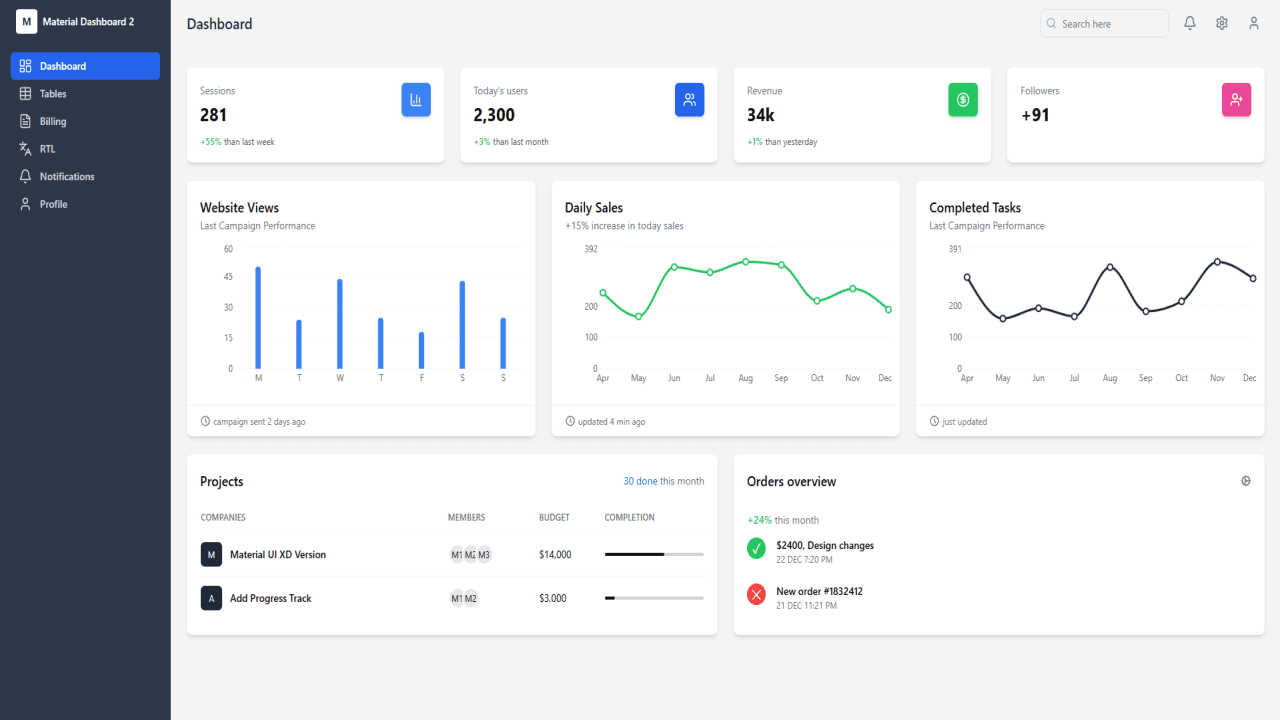
Project Description
React Responsive Dashboard Using Tailwind and ShadCN
Building modern web applications often requires a flexible, responsive, and modular dashboard interface. In this article, we'll guide you through creating a comprehensive dashboard using React, styled with Tailwind CSS, and powered by components from ShadCN UI.
This article includes the following modules:
Dashboard Overview
Tables
Billing Section
RTL (Right-to-Left) Support
Notifications Panel
Profile Management
Why React, Tailwind CSS, and ShadCN UI?
React
React is one of the most popular JavaScript libraries for building user interfaces. With its component-based architecture and strong community support, React makes it easy to create dynamic and maintainable front-end applications.
Tailwind CSS
Tailwind CSS is a utility-first CSS framework that allows rapid UI development without writing custom styles. It provides design consistency, ease of customization, and performance benefits due to its purging capabilities.
ShadCN UI
ShadCN is a modern, beautifully designed component library built with Tailwind and Radix UI. It simplifies the development of complex UIs with accessible, themeable, and customizable components.
1. Dashboard Module
The Dashboard module provides a snapshot of key metrics and activities. It is often the landing page for users post-login.
Features:
Key performance indicators (KPIs)
Charts and graphs (using libraries like Recharts or Chart.js)
Quick navigation shortcuts
Responsive grid layout
Implementation Tips:
Use Tailwind's grid and flex utilities for layout
Utilize ShadCN Cards, Buttons, and Typography for consistency
2. Tables Module
Tables are essential for displaying structured data such as user records, transactions, or analytics.
Features:
Search and filter functionality
Pagination
Sorting
Action buttons (edit/delete)
Implementation Tips:
Use
@shadcn/uiTable component with Tailwind for stylingImplement client-side state with hooks like
useStateanduseEffectFor large data sets, consider lazy loading or server-side pagination
3. Billing Module
Billing modules manage invoices, transactions, and payment history.
Features:
Invoice generation and download
Payment method management
Transaction history
Subscription plans
Implementation Tips:
Secure sensitive data with tokenized APIs
Display currency and dates using internationalization (i18n)
Use modals from ShadCN for user actions like "Add Payment Method"
4. RTL (Right-to-Left) Support
Right-to-left language support is crucial for global applications, especially in Arabic, Hebrew, and Persian-speaking regions.
Features:
Toggle between LTR and RTL
Mirror UI components accordingly
Maintain consistent typography and alignment
Implementation Tips:
Use Tailwind's
dir="rtl"and logical CSS classesShadCN supports theming and direction changes through configuration
Test UI in multiple languages
5. Notifications Module
The notifications panel keeps users informed about system updates, alerts, and user-specific messages.
Features:
Real-time push notifications (via WebSockets or polling)
Notification bell icon with badge
Categorization and filtering
Read/unread status
Implementation Tips:
Use Toasts and Alerts from ShadCN for quick popups
Store notifications in state or use global context
Mark notifications as read via onClick events
6. Profile Management
The profile section enables users to view and manage their personal information, password, and preferences.
Features:
Editable user information
Change password option
Profile photo upload
Privacy settings
Implementation Tips:
Use forms and modals from ShadCN
Validate inputs using libraries like Zod or Yup
Secure sensitive actions (like password change) with 2FA or confirmation